

A client's company website, with clean code and a clean origin server, started showing a fake "verify you are human" check that asked visitors to paste a command into their computer, because a rule at the CDN appended a script to the page on its way to the browser. A computer on our team ran the command, the antivirus saw nothing, and we treated the machine and every credential reachable from it as compromised. What a visitor receives passes through DNS, the CDN, third party scripts and the accounts of whoever manages them, and none of those layers lives in the repository: that is where you check, and that is where you demand access control.
How a website with clean code ended up serving a scam#
A website can serve a scam to its visitors with its code untouched, because what reaches the browser passes through layers that are not in the repository. On October 7, 2026, a client's company website, which we built and which runs on Vercel, started showing a fake "verifying you are human" screen. The screen imitated Cloudflare's own check, Cloudflare being the CDN in front of the site, and asked the visitor to paste a command into their computer.
The code and the origin server were clean. The scam script was added to the page on the way, at the CDN edge, between the server and the browser.
A computer on our team opened the site and followed the instructions. The command injected code into Windows processes, with the typical behavior of a credential stealer, and left a program that started again on its own every time the computer booted. The Windows antivirus detected nothing.
We are telling this story because it shows something almost no business owner considers when hiring someone to build a company website: between the code and the visitor sit DNS, the CDN, other companies' scripts and the accounts of whoever manages each of them. Any of those layers can change the page without anyone touching the code, and that is where checks and access control need to be.
What the fake "verify you are human" scam is (ClickFix)#
ClickFix is a scam in which the victim runs the malicious program themselves. The page shows a fake check, such as a CAPTCHA, a browser error or a security verification. On click, the person unknowingly copies a command to the clipboard, and the page asks them to open a terminal or the Windows Run dialog, paste and press Enter.
Microsoft Threat Intelligence described the technique in August 2025 and said campaigns target thousands of enterprise and consumer devices every day. According to the report, the pages imitate reCAPTCHA and Cloudflare Turnstile, arrive through email, ads and compromised legitimate websites, and the most common final payload is an information stealer. Since a person runs the command, the attack gets past automated defenses that inspect email and files.
That is what happened in our case. The pasted command fetched the next stage from a GitHub account created two days earlier, served through a public open source CDN, and there was one version of the scam for Windows and another for Mac.
Why the next stage came from a blockchain contract (EtherHiding)#
The script injected into the site did not carry the whole scam. It queried smart contracts on a test blockchain network to learn what to show and which command to copy, a technique called EtherHiding.
Guardio Labs documented the technique in October 2023: compromised websites loaded a script that read the contents of a contract on BNB Smart Chain and ran it on the page. To change the scam, the attacker sent a new transaction to the contract, without going back to the websites. The Google Threat Intelligence Group wrote in October 2025 that the technique turns the blockchain into a "decentralized and highly resilient" command server, because there is no central server to take down.
For the site owner, the practical consequence is that blocking an address does not solve it, since the attacker changes the scam without touching the site again. What solves it is removing the script from the page and closing the door it came through.
How we proved the problem was at the CDN and not in the code#
The proof was requesting the same page along two paths and comparing them. Through the public address, the request goes through the CDN. With curl and its --resolve option, the same request, with the same domain name, goes straight to the IP address of the origin server on Vercel, skipping the CDN. The page from the origin was clean. The page from the normal path had one extra <script>, right before the end of the page body, the </body> tag.
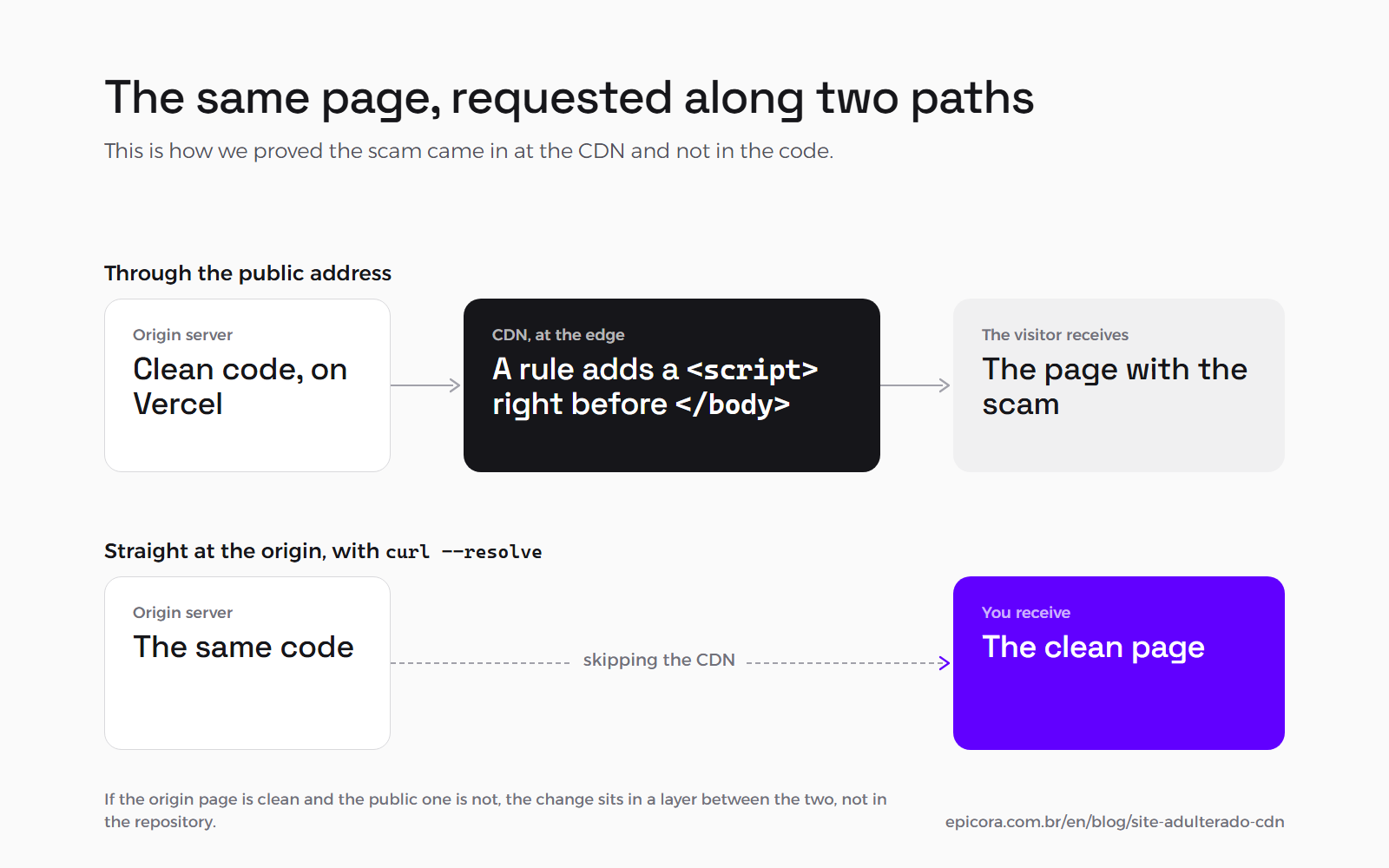
That points to a rule running at the edge: a Worker or a Snippet, the two Cloudflare features that run code on the path between the origin and the visitor. Cloudflare's documentation describes HTMLRewriter, the Workers tool that reads and changes HTML as it streams through, with a method that inserts content right before an element's end tag. Applied to the page body, that is what we found. Snippets, also according to the documentation, modify requests and responses, headers included.
These features have legitimate uses, such as redirects or header adjustments, and whoever has access to them has access to what every visitor receives.
We do not know how the rule got into the CDN configuration. The investigation of that part did not reach a cause we can state. What we can say is that the rule only exists inside the CDN account, so the door was someone, or something, with access to that account.
Where a website can be tampered with without changing the code#
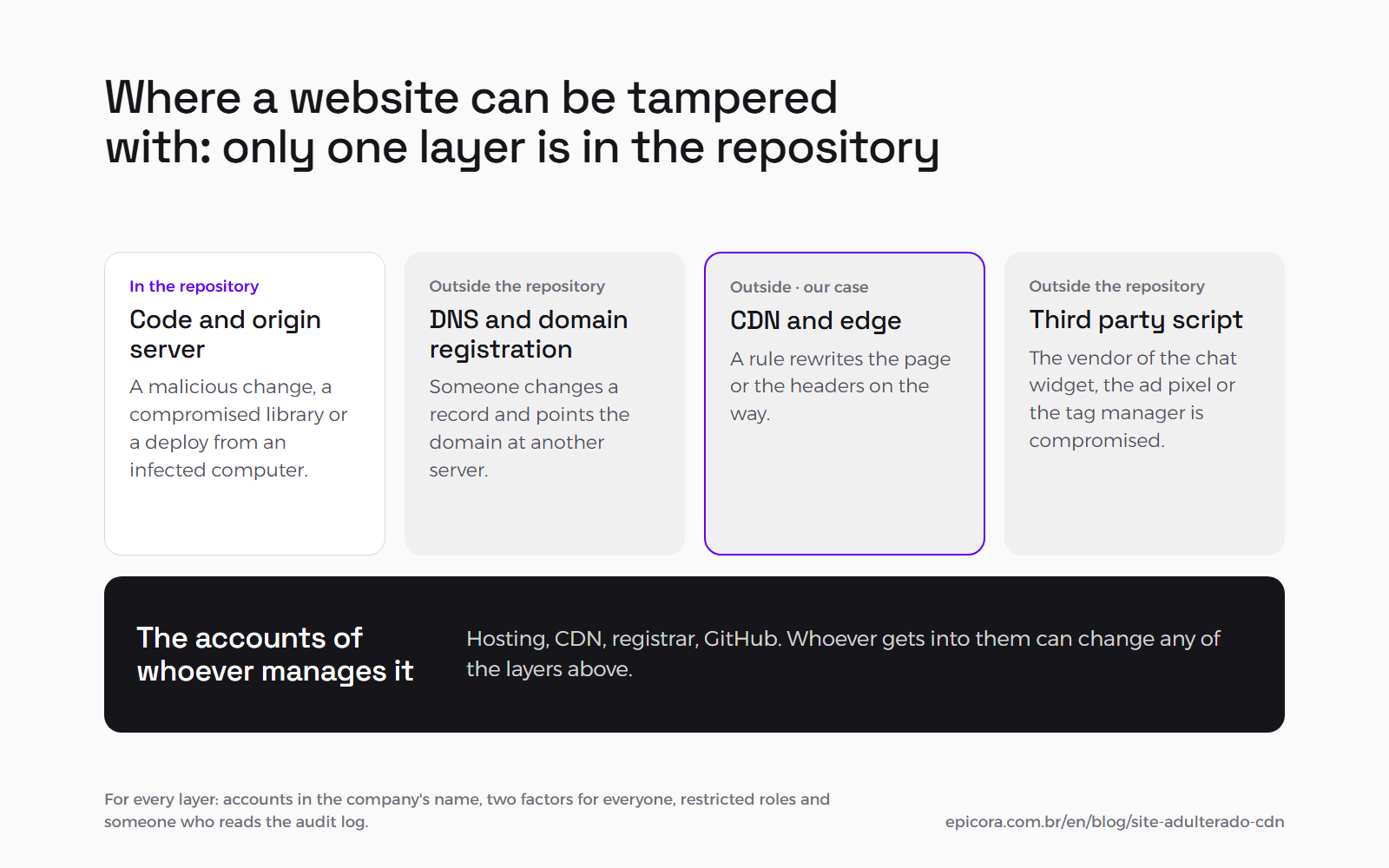
A website can be tampered with at five layers, and only the first shows up in the repository. The other four change what the visitor receives without leaving a trace in the code.
| Layer | How it gets tampered with | How to detect it | Who should have access |
|---|---|---|---|
| Code and origin server | a malicious change to the code, a compromised library or a deploy made from an infected computer | review of every change before release, and deploy history checked against the repository | the development team, with deploys only through the automated pipeline and mandatory review |
| DNS and domain registration | someone changes the nameservers or a record and points the domain at another server | periodic checks of the records and change alerts at the registrar | the company that owns the domain, in an account under its name with two factor authentication; developers only with DNS edit rights, when needed |
| CDN and edge | a rule (Worker, Snippet or transform rule) rewrites the page or the headers on the way | request the page through the public address and straight at the origin and compare; read the account audit log | a few administrators; everyone else with a narrow role, such as DNS only, cache only or read only |
| Third party script | the vendor of the chat widget, the ad pixel or the tag manager is compromised, or someone adds a tag through its dashboard | an inventory of the domains the page loads scripts from, with an alert when a new one appears | one person who approves every new script, with the tag manager under the same access rule as the site |
| Accounts of whoever manages it (hosting, CDN, registrar, GitHub) | a leaked password, a browser session stolen by a credential stealer or an API token with too much permission | audit log, new device login alerts and periodic review of members and tokens | personal, named accounts, never shared, with two factor authentication; tokens with scope, IP restriction and an expiry |
The last row cuts across all the others, because whoever gets into the account can change any layer. Cloudflare, for example, lets you require two factor authentication from every member, split roles (DNS only, read only, Workers platform only), create tokens limited to resources, IP addresses and a time window, and keeps an audit log of logins and configuration changes for 18 months. These are options: somebody has to turn them on, configure them and read them.
What we did in the following hours#
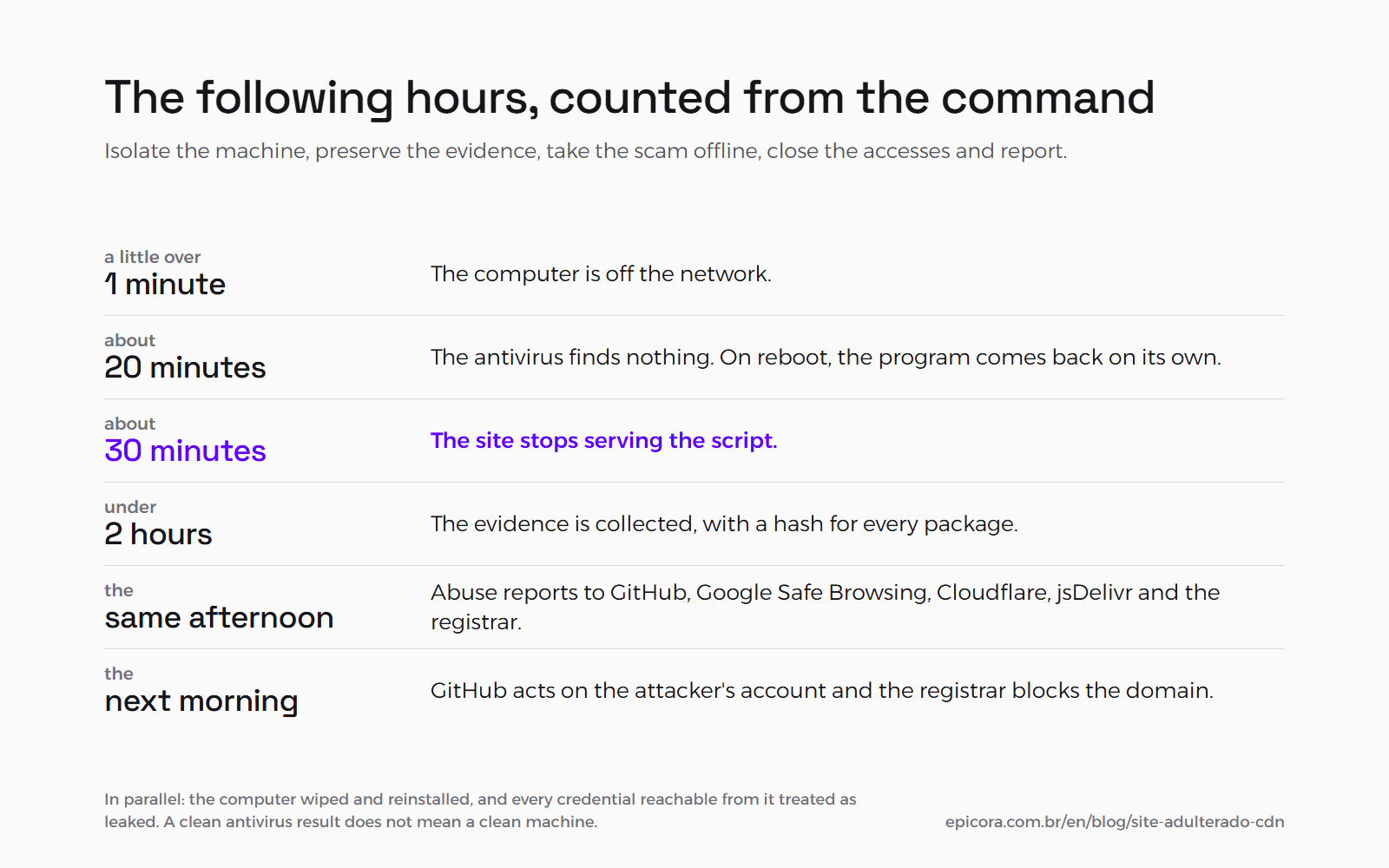
The response was to isolate the machine, preserve the evidence, take the scam offline, close the accesses and report the attacker's infrastructure. In broad milestones, counted from the moment the command ran:
- A little over a minute later, the computer was off the network.
- About 20 minutes later, an offline antivirus scan found nothing. On reboot the program came back on its own. A clean antivirus result does not mean a clean machine.
- About half an hour later, the site stopped serving the script. We notified the client and walked them through cleaning up the CDN configuration, which they did, and the site was back to normal the same day.
- In under two hours, the evidence was collected, with a hash for every package: Windows logs, processes, autostart entries and the malware sample, stored in a restricted folder. After that the machine went off the network for good.
- The same afternoon, we sent abuse reports to GitHub, Google Safe Browsing, Cloudflare, jsDelivr and the registrar of the domain serving the second stage. Cloudflare restricted access to the reported address that same day.
- The next morning, GitHub concluded the account violated its terms of service and acted on it, and the registrar blocked the domain. jsDelivr had not replied more than two weeks later.
In parallel, the computer was wiped with a full operating system reinstall, and projects came back from GitHub, not from a disk copy. The accounts open in that browser had their sessions ended and their passwords changed, and the Google Workspace audit showed no unusual access. We treated the credentials reachable from that machine as leaked and started rotating them the same day, highest risk first; the rest followed in the weeks after. We also scanned the 172 repositories in our organization for secrets committed to code.
What to do in the first hour if your website is tampered with#
In the first hour, the order is to take the scam offline, close the door and look after anyone who already fell for it, without destroying the evidence along the way.
- Do not open the site again on a work computer. Tell whoever runs the site and ask for the public page versus origin comparison, which pins down the tampered layer in minutes.
- Take the script offline. Disable the suspicious CDN rule or put the site in maintenance mode. Copy the rule before deleting it: it is the evidence of how the page was altered.
- Close the door. Change the password and end the sessions of the CDN, registrar and hosting accounts, revoke API tokens, turn on two factor authentication wherever it is off, and read the audit log to see who changed what, and when.
- Look after whoever ran the command. If someone at the company pasted it, the computer goes off the network and stays off, even if the antivirus says it is clean. Collect evidence before wiping it and treat the credentials reachable from that machine as leaked.
- Notify and report. Tell the team and the people who usually visit the site, report the page to Google Safe Browsing and the next stage addresses to the services hosting them. Check with legal counsel whether personal data was involved and whether the data protection authority needs to be notified.
- Write down the timeline as you go. The time of each action becomes the incident report, and it is what lets you explain later what was exposed and for how long.
What does not protect you, even though it looks like it should#
A clean repository does not prove a clean website. No review would have caught this case, because nothing was wrong in the code: AI code review, like human review, looks at what is in the repository, and the change was outside it.
Neither does antivirus. In our case it detected nothing, not even on the offline scan, and Microsoft explains that ClickFix gets past automated defenses precisely because the person runs the command.
A Content Security Policy (CSP), which tells the browser which addresses a page may load scripts from, helps against a lot, but not against whoever controls the edge. According to MDN, it reaches the browser in a response header, and a CDN rule that rewrites the HTML can rewrite that header too.
Changing only the password of the site's admin panel does not close the door, because the change was not in the panel. And dropping the CDN is not the answer: the problem is who has access to it.
Training the team never to paste a command that came from a website is necessary, and it is not enough on its own, because the scam changes shape. The same reasoning applies to AI agents that read web pages and have terminal access: outside text can carry an instruction, as we explain in prompt injection.
What we changed after the incident#
We changed two rules in our routine, both about what is within reach of someone who falls for a scam.
The first is that nobody pastes into a terminal a command that came from a website, an email or a message. No legitimate website asks for that to prove you are human, and a rule this simple is easier to follow than judging each case on the spot.
The second is about secrets. Project keys and passwords are moving out of .env files scattered across laptops and into the secrets vault we already used for deployments, with a separate credential per project and the least access each one needs. That way, a compromised laptop exposes much less.
What to demand from whoever runs your website#
Whoever runs the site needs to answer for every layer, not only for the code. That question already comes up when choosing the platform for a company website, and it is worth asking before and after delivery:
- Are the accounts in the company's name? Domain, CDN and hosting should sit in accounts your company controls, with the agency or developer added as a member.
- Who has access to each layer, and with which role? Ask for the list, with two factor authentication on for everyone and narrow roles for anyone who is not an administrator.
- Do API tokens have a scope and an expiry? A token that can do everything, forever, is an administrator password kept in a file.
- Does anybody read the audit log? Agree on who reads it and how often, and who gets the new device login alert.
- Is there an outside monitor? A checker that requests the public page every so often and raises an alert when a script from a new domain shows up, the same way you monitor whether the contact form still delivers its messages.
- Is there a plan for the first hour? Who gets called, who takes the site offline and who talks to customers. That gets agreed in the warranty and support after delivery, not on the day of the incident.
Frequently asked questions#
Can my website serve a scam even if nobody touched the code?#
Yes. What a visitor receives passes through DNS, the CDN, third party scripts and the accounts of whoever manages each of them, and any of those layers can change the page on the way. In a case we handled in October 2026, the code and the origin server were clean, and a rule at the CDN appended the scam script to every page it delivered.
How do I find out whether my website is being tampered with at the CDN?#
Request the same page along two paths and compare them: through the public address, which goes through the CDN, and straight at the origin server, with the same domain name. Whoever runs the site does this with curl and its --resolve option. If the public page carries a script the origin does not, the change is happening in between, and the audit log of the CDN account shows who changed what.
What is the ClickFix scam and how do I recognize it?#
It is a page that imitates a check, such as "verify you are human" or a browser error, copies a command to the clipboard and asks the person to paste it into a terminal or the Windows Run dialog. No legitimate website asks you to do that to prove you are human. If a page asks you to paste something into a terminal, close it and tell whoever handles security.
Does antivirus protect against ClickFix?#
You cannot count on it. On the computer on our team that ran the command, the Windows antivirus detected nothing, not even on an offline scan right afterwards. Microsoft explains that because the person runs the command, the attack can get past automated defenses. The protection that works is a rule of never pasting a command that came from a website.
What should we do if someone at the company pasted the command?#
Take the computer off the network and keep it off, without trusting a clean antivirus scan. Collect the evidence before wiping it, reinstall the operating system and treat every credential reachable from that machine as leaked: browser passwords and sessions, API keys and configuration files. Then rotate all of it, starting with whatever reaches money, databases and email.
Sources#
- Microsoft Threat Intelligence, "Think before you Click(Fix): Analyzing the ClickFix social engineering technique", August 21, 2025 (how the scam works, its daily scale and the recommendations): https://www.microsoft.com/en-us/security/blog/2025/08/21/think-before-you-clickfix-analyzing-the-clickfix-social-engineering-technique/
- Guardio Labs (Nati Tal and Oleg Zaytsev), "EtherHiding: Hiding Web2 Malicious Code in Web3 Smart Contracts", October 2023 (the script that reads its next stage from a BNB Smart Chain contract): https://guard.io/labs/etherhiding-hiding-web2-malicious-code-in-web3-smart-contracts-65ea78efad16
- Google Threat Intelligence Group, "DPRK Adopts EtherHiding", October 16, 2025 (why the technique resists takedown): https://cloud.google.com/blog/topics/threat-intelligence/dprk-adopts-etherhiding
- Cloudflare Docs, HTMLRewriter (changing HTML on the way, including inserting content before an element's end tag): https://developers.cloudflare.com/workers/runtime-apis/html-rewriter/
- Cloudflare Docs, Snippets (code that modifies requests and responses at the edge): https://developers.cloudflare.com/rules/snippets/
- Cloudflare Docs, Two-factor authentication, Roles, Create API token and Review audit logs (two factor enforcement for every member, narrow roles, tokens limited by resource, IP and time, logs kept for 18 months): https://developers.cloudflare.com/fundamentals/user-profiles/2fa/ · https://developers.cloudflare.com/fundamentals/manage-members/roles/ · https://developers.cloudflare.com/fundamentals/api/get-started/create-token/ · https://developers.cloudflare.com/fundamentals/account/account-security/review-audit-logs/
- MDN Web Docs, Content Security Policy (CSP) (the policy reaches the browser in a response header): https://developer.mozilla.org/en-US/docs/Web/HTTP/Guides/CSP
Next step#
If you want to know who has access to each layer of your website and whether anyone would notice a change at the CDN, that review is part of our work on company websites. And what happens when something breaks after delivery is covered in warranty and support.
Want to look at this in your case?
Tell us in a few lines what you have today. We reply with the path that makes sense, even when the answer is not to build anything.