
A notification map, also called a notification matrix, is the document that lists, before development, every alert a system sends: the event that triggers it, who receives it, through which channel, at what moment, with what text, what happens if it does not arrive and who must not receive it. In the health app we are modeling, it holds 78 notifications, and users can turn off only 3 of them. Written before the code, it prevents alerts to people on leave, verification codes over WhatsApp stuck waiting for Meta approval and sensitive data on a locked phone screen.
What is a notification map#
A notification map is the document that lists every alert a system sends, one per row, before anyone writes the code. Each row says what triggers the alert, who receives it, through which channel, at what moment, with what text and what happens if it does not arrive. It comes out of the scope and works as the specification for developers and as the script for testers. Some teams call it a notification matrix.
In a scope document, alerts tend to be scattered, in a sentence like "the client is notified" in the middle of a module description. The map gathers all those sentences in one place and makes each of them answer the same questions.
Every notification gets a fixed code, such as AUTH-01 or PAG-03, which follows the alert into the source code, the server logs and the tests. When an alert leaves the product, its code is retired and never used again.
The size of the map depends on the product. In the health app we are modeling, it holds 78 notifications, for the patient, the doctor and the team that runs the platform. In a technical reports system we mapped, it holds two, both by email and both about account access. Both maps are complete. The map is one of the documents we deliver before development in every custom software project that sends alerts.
What each row of the map has to say#
A complete row answers seven questions: which event triggers the alert, who receives it, through which channel, when it goes out, what the text says, what happens if delivery fails and who, even though involved in the event, must not receive it. When one of them is left blank, the answer ends up being given by whoever is writing the code, in the middle of the task.
- The event. The fact in the system that triggers the alert, written as it happens: "the payment was approved", rather than just "payment alert".
- Who receives it. The profile and, sometimes, the exact person, such as the case owner, or every administrator when the case has no owner yet.
- The channel. Email, push, WhatsApp, SMS or the alert inside the system itself.
- When. Right away, at a fixed time, some time before an appointment or after a deadline has passed.
- The text. The subject and the body, with the variables marked. Account access notifications and the ones that explain money have their text written in the map itself.
- On failure. What the system does when the alert does not arrive: try another channel, keep the alert inside the system or do nothing, because the alert is optional.
- Who does not receive it. The person who, by the logic of the event, would receive it, and who by a rule must not.
The excerpt below puts together rows from real maps, with the text shortened.
| Event | Who receives it | Channel | When | On failure | Who does not receive it |
|---|---|---|---|---|---|
| Verification code at sign-up and login | the person signing in | WhatsApp or SMS, the person chooses | right away, short validity | WhatsApp failed and the code goes out by SMS, with no action from the person | nobody but the owner of the number |
| Appointment reminder | patient | push and email | 24 h and 30 min before, both adjustable | the alert also stays in the app notification center | not sent if the appointment was cancelled or has already started |
| Appointment reminder | doctor | push | 1 h and 10 min before, adjustable | whoever did not allow push gets it by email | not sent if the appointment was cancelled or has already started |
| Account email changed | account owner | email, to the old address | right away | no second channel | the new address, which may belong to whoever took over the account |
| New report received | active administrators of the company | email, with nothing from the report | as soon as the report arrives | no second channel | the person who reported, who gives no contact |
| Case assigned | the new owner | right away | no second channel | the person who assigned the case to themselves | |
| Payment or payout failure | administrator | in the panel, in the browser and by email, which cannot be turned off | right away | the alert stays in the panel bell | the platform operator |
The first row is from the WhatsApp verification code we are adding to Helpe, a Brazilian marketplace for local services. The others come from the health app we are modeling and from the anonymous reporting channel we are building.
Why write the map before the code#
The map comes before the code because almost every notification depends on a business rule and on a channel with its own deadlines and costs, and both change what gets built. Finding that out in the middle of development costs rebuilt screens and database tables, or a delivery stalled while waiting for another company's approval.
The rule shows up first in the "who receives it" column. To stop alerting someone who is on vacation, the system has to store that information. In GT's feedback on the prototype, in September, the client asked for a vacation period in the operator record and for inactive operators to leave the operation. Leave became a list of periods, with vacation, sick leave and other leave in the same mechanism, and the alert rule was written down: an operator on leave or inactive receives no checklist and no notification, and an operator on leave has no login to the app during the period. That rule only works if the database stores each person's status, which is why it has to be decided before the record screens are built.
The channel brings deadlines that do not belong to the development team. At Helpe, the verification code over WhatsApp depends on Meta approving the authentication message template, and the scope of the update states in writing that, without that approval, sending over WhatsApp does not work in production. Before that, Helpe's SMS login had to go through AWS's own review to send SMS in Brazil. Those steps go into the schedule at the start of the project.
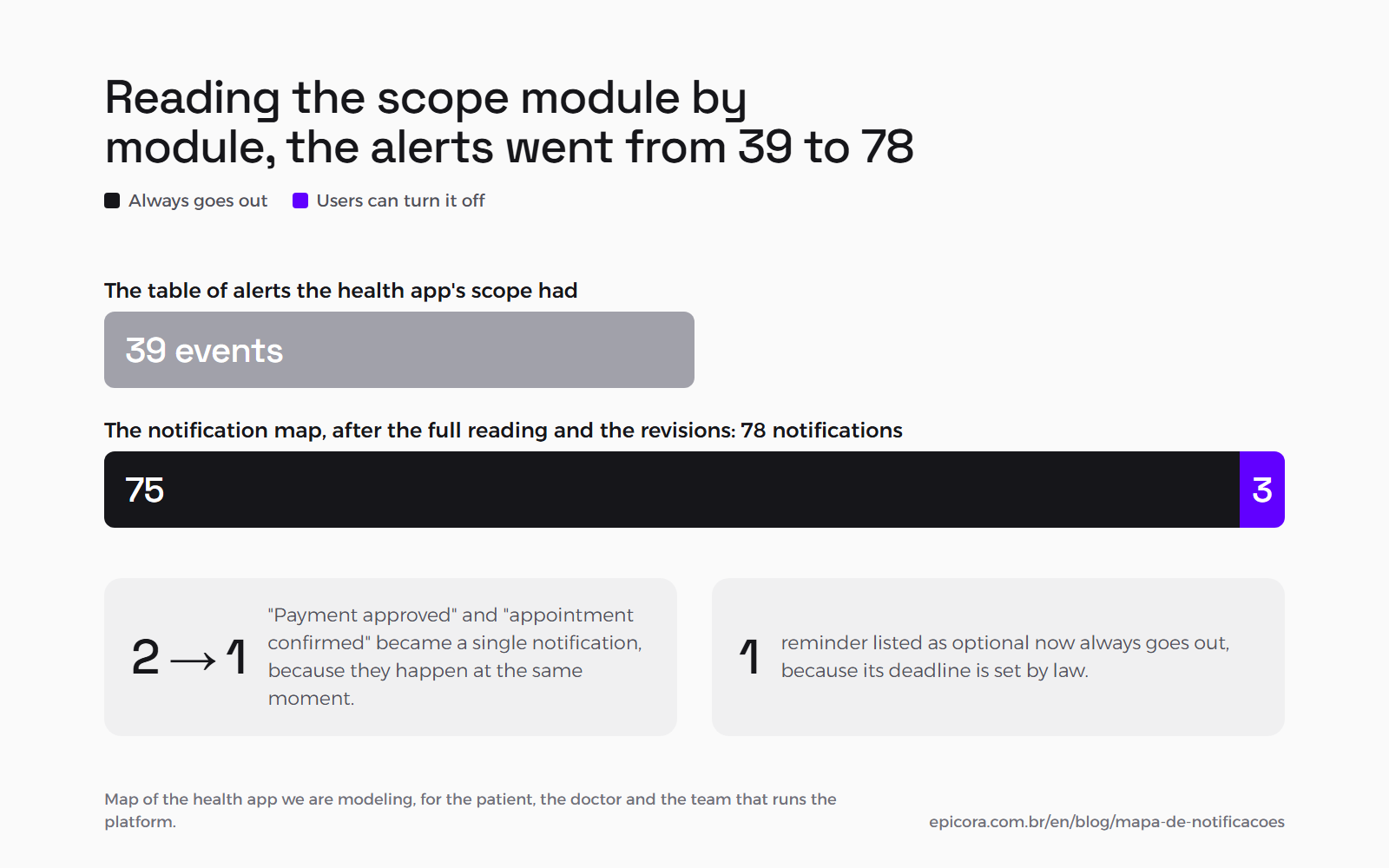
The count also changes when someone reads the whole scope looking for alerts. When the scope of the health app still had its own table of alerts, it listed 39 events. Reading it module by module and going through the revisions, the map reached 78. In the same reading, two events in the scope, "payment approved" and "appointment confirmed", became a single notification, because they happen at the same moment and would send two messages about the same fact. And a reminder the scope listed as optional became essential, because its deadline is set by law and the patient cannot turn it off.
The reminder timings stay adjustable in the settings, because the business changes those numbers with use. The criterion for deciding what becomes a setting is in when to turn a business rule into a parameter.
Who must not receive the notification#
"Who does not receive it" is the column that protects the system the most, and the one almost nobody asks for. It usually covers four cases: whoever has left the operation, whoever cannot be identified, whoever already knows about the fact and the address that may be in the hands of whoever took over the account.
Whoever has left the operation. At GT, the checklist and the notification never even reach the app of an operator on leave or inactive.
Whoever cannot be identified. In the anonymous reporting channel we are building, the person who files a report receives zero notifications. They give no contact and follow the case by protocol number. Alerts go only to the company team, by email, with nothing from the content of the report. The full design is in how to guarantee anonymity in a whistleblowing channel.
Whoever already knows. In the same channel, the "case assigned" alert does not go out when a person assigns the case to themselves. While a case is flagged with a new message, the following messages do not trigger another alert.
The address that may have been taken over. In the health app, the alert that the account email changed goes to the old email. The alert that the second factor was changed goes to the account email and never to the new method. If someone took over the account and changed the contact, the real owner still finds out.
What happens when a notification does not arrive#
When a notification does not arrive, the system does what the map told it to: try another channel, keep the alert inside the system or do nothing, if the alert is optional. And no business rule depends on the person having seen the alert.
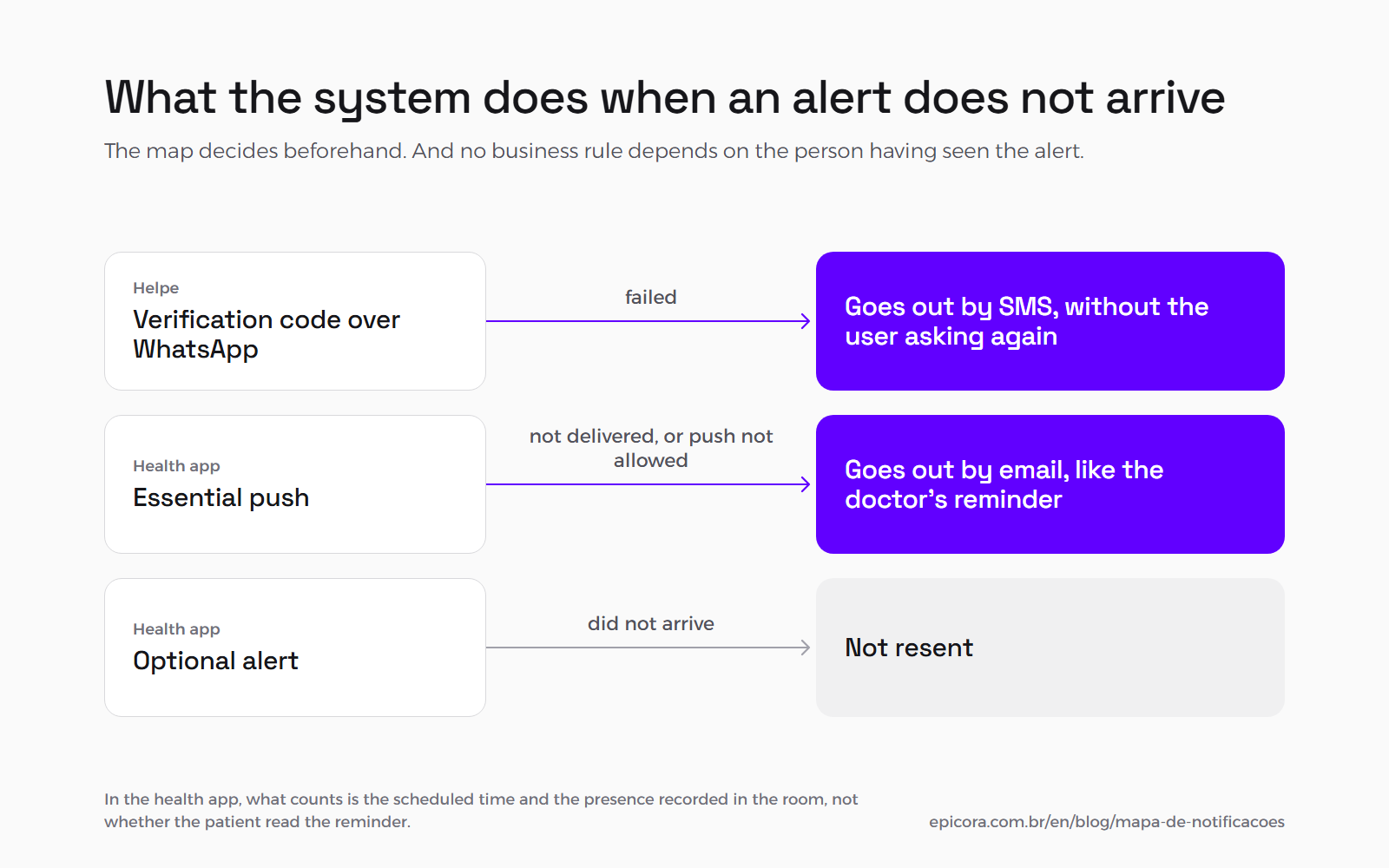
At Helpe, if the WhatsApp code fails, it goes out by SMS automatically, without the user having to ask again. In the health app, when an essential push is not delivered, email kicks in, and whoever did not allow push on the phone receives by email every essential alert that would otherwise be push only, such as the doctor's reminder. Optional alerts are not resent.
In the health app, what counts is the scheduled time and the presence recorded in the room, and not whether the patient read the reminder. Guideline 4.5.4 of the App Store says the same thing another way: push notifications must not be required for the app to function.
Email also fails silently, by landing in spam. According to Google's email sender guidelines, every domain that sends email to Gmail needs SPF or DKIM authentication and has to keep its spam rate below 0.3%. Anyone sending more than 5,000 messages a day also needs DMARC. That domain setup goes on the task list together with the map.
How to choose the channel for each notification#
The channel is chosen by what the alert needs, such as reaching everyone, arriving right away or being kept, and by the limitation of each channel.
Email. Every profile has one, and it is the channel for secure links, codes and long content. It is also the backup channel when push fails.
Push. It arrives right away and shows on the lock screen. In a web system, Android receives it through the browser, and on the iPhone web push only exists since iOS 16.4, for sites added to the Home Screen, and the permission request has to come from a tap by the person, as WebKit announced in February 2023. When push on the iPhone is essential to the product, the decision goes back to the question of mobile app or web system.
WhatsApp. Meta has rules for a business that starts the conversation. According to the WhatsApp Business Platform documentation, once the 24-hour customer service window closes, the business can only send approved message templates. Every template is categorized as authentication, utility or marketing, and the review can take up to 24 hours. Verification codes must use the authentication template, with fixed text. In the health app, WhatsApp was left out of the alerts and serves only as the operations contact for general questions.
SMS. It reaches any phone, with little room. According to the AWS SMS service documentation, one message fits 160 characters when it uses only the GSM alphabet, and 70 when it has any character outside it. In Portuguese, the tilde in "não" and the accent in "você" are outside it. Longer messages are split into parts, and each part is charged. In the health app, SMS carries only the verification code.
In the product. This is the alert that shows inside the system, in a bell or a notification center, marked read or unread. In a discovery meeting in September, a client put "notification history" on the list of what they wanted. In the map, that request becomes a decision: who gets a center, what goes into it and how long it is kept.
What should not become a notification#
A notification is not "send an email about everything". The map also decides what does not become an alert: what the person is already looking at on the screen, repeats of the same subject, marketing campaigns and sensitive data.
Apple's Human Interface Guidelines use Mail itself as the example: when a message arrives in the mailbox the person is viewing, the app just adds it to the list, without a notification. The same guidelines ask apps not to send multiple notifications for the same thing, even if the person has not responded, because people may end up turning off all notifications from the app.
In the health app, that became a written rule: messages in a conversation within 2 minutes become a single alert, operations alerts of the same type are grouped over 10 minutes, and an alert that repeats because of a pending item goes out at most once a day.
Campaigns are left out too. In the health app, no module sends company news. App Store guideline 4.5.4 only allows push for promotions or marketing when the person has opted in, through consent language inside the app, and has a way to opt out.
And sensitive content does not go into the alert. Apple's guidelines ask apps not to include sensitive, personal or confidential information in a notification, because there is no way to know who is near the screen. In the health app, push and email never carry clinical data, complaints, documents or a patient's name. The push shows the date, the time and the shortcut, and the content stays inside the app, behind the login.
Frequently asked questions#
Does every system need a notification map?#
Every system that sends any alert does, even when the map turns out small. In a technical reports system we mapped, it has two notifications, both by email and both about account access. Writing that down recorded that the end client receives nothing automatic and that the administrator sends the report link. Without the map, that decision would have been left to whoever was writing the code.
Who writes the notification map?#
We do, from the validated scope and before development. The map comes out in two passes: first the complete document, then a coverage report that checks whether every event in the scope has a row in the map and whether every row in the map comes from something the scope describes. The client reviews who receives each alert, the tone of the texts and what can be turned off.
Can any system send notifications over WhatsApp?#
It can, under three conditions. Outside the 24-hour window opened by the user's last message, the business can only send a message template approved by Meta. Verification codes use a dedicated authentication template with fixed text. And sending goes through a provider of the official API, which charges for the messages: at Helpe, the admin panel got a shortcut to the provider account, where the team keeps an eye on the balance. Approval time is up to Meta, so it goes into the schedule as a dependency.
Can users turn notifications off?#
They can turn off the configurable ones, such as a review request or a suggestion to book again. The transactional ones, which cover account access, money and the progress of the service, always go out. In the health app we are modeling, 75 of the 78 notifications are transactional and 3 are configurable.
Can users see their notification history inside the system?#
Yes, with a notification center, which keeps inside the system what each person received, marked read or unread. In the health app we are modeling, every push and email alert also goes into the center. The map defines who gets a center and how long it keeps the alerts.
Sources#
- Meta, WhatsApp Business Platform, message templates (approval, categories and review time): https://developers.facebook.com/docs/whatsapp/business-management-api/message-templates/
- Meta, WhatsApp Business Platform, authentication templates: https://developers.facebook.com/docs/whatsapp/business-management-api/authentication-templates/
- Meta, WhatsApp Cloud API, sending messages (24-hour customer service window): https://developers.facebook.com/docs/whatsapp/cloud-api/guides/send-messages/
- WebKit, "Web Push for Web Apps on iOS and iPadOS", February 16, 2023: https://webkit.org/blog/13878/web-push-for-web-apps-on-ios-and-ipados/
- Apple, Human Interface Guidelines, Notifications: https://developer.apple.com/design/human-interface-guidelines/notifications
- Apple, App Store Review Guidelines, revision of June 8, 2026 (guideline 4.5.4): https://developer.apple.com/app-store/review/guidelines/
- AWS End User Messaging SMS, character limits: https://docs.aws.amazon.com/sms-voice/latest/userguide/sms-limitations-character.html
- Google, email sender guidelines: https://support.google.com/a/answer/81126
Next step#
If your system will alert customers, staff or suppliers, the notification map comes together with the scope in our custom software projects, before the first line of code. At Helpe, the channel was decided by the audience: many of its users barely use email day to day, which is why login is by SMS.