

Automating administrative processes starts with a list of each area's tasks, with volume and time, and not with the tool. Many tasks already have a ready-made solution, sometimes from a vendor the company already pays: at an accounting firm we work with, that was true of its three biggest pain points, and two of them were covered by a vendor the firm was already paying. AI belongs where there is text to read, classify or write, integration and rule-based automation belong where no judgment is involved, and custom development is for what is left over.
Where to start automating administrative processes#
Start with the task list, not the tool. For each area of the company, write down the tasks that repeat, how often they happen and how long each one takes. Only with that list can you tell what to automate and with what.
Conversations about automating with AI usually start the other way around. Someone has watched a video about n8n, Power Automate or an AI agent and wants to know where to fit it in. A tool picked before the task ends up looking for a problem to solve.
A spreadsheet with one row per task and five columns is enough:
- Area: finance, tax, sales, customer service, HR.
- Task, written with a verb: enter an invoice, check time records, answer a quote request.
- Volume: how many times per week or per month.
- Time each instance takes, and whose time it is.
- Where the data lives before and after the task: a system, a spreadsheet, email, WhatsApp or paper.
Volume and time are the columns most often missing. At an accounting firm we work with, each area answered a written survey before an AI training session. The answers showed clearly what hurt and which systems were in place, but they brought neither volume nor numbers. Without them there is no way to tell whether automating pays off, and WhatsApp message triage, one of the ideas raised there, was left out of the proposal for that reason.
Before automating, check what already exists#
Before automating any task, ask whether it already has a ready-made solution, starting with the vendors the company already pays. Many administrative pain points are the same across a whole industry, and the market has already solved them. Custom development is for what is left over.
The clearest case we have is an accounting firm split into seven teams. Its three biggest pain points were employee time records, keeping up with collective bargaining agreements and collecting invoices. All three already had a ready-made solution on the market, and two of them were covered by a vendor the firm was already paying: its accounting software had launched a module for tracking collective agreements, and the time-clock systems on the market already export in the format that accounting software imports.
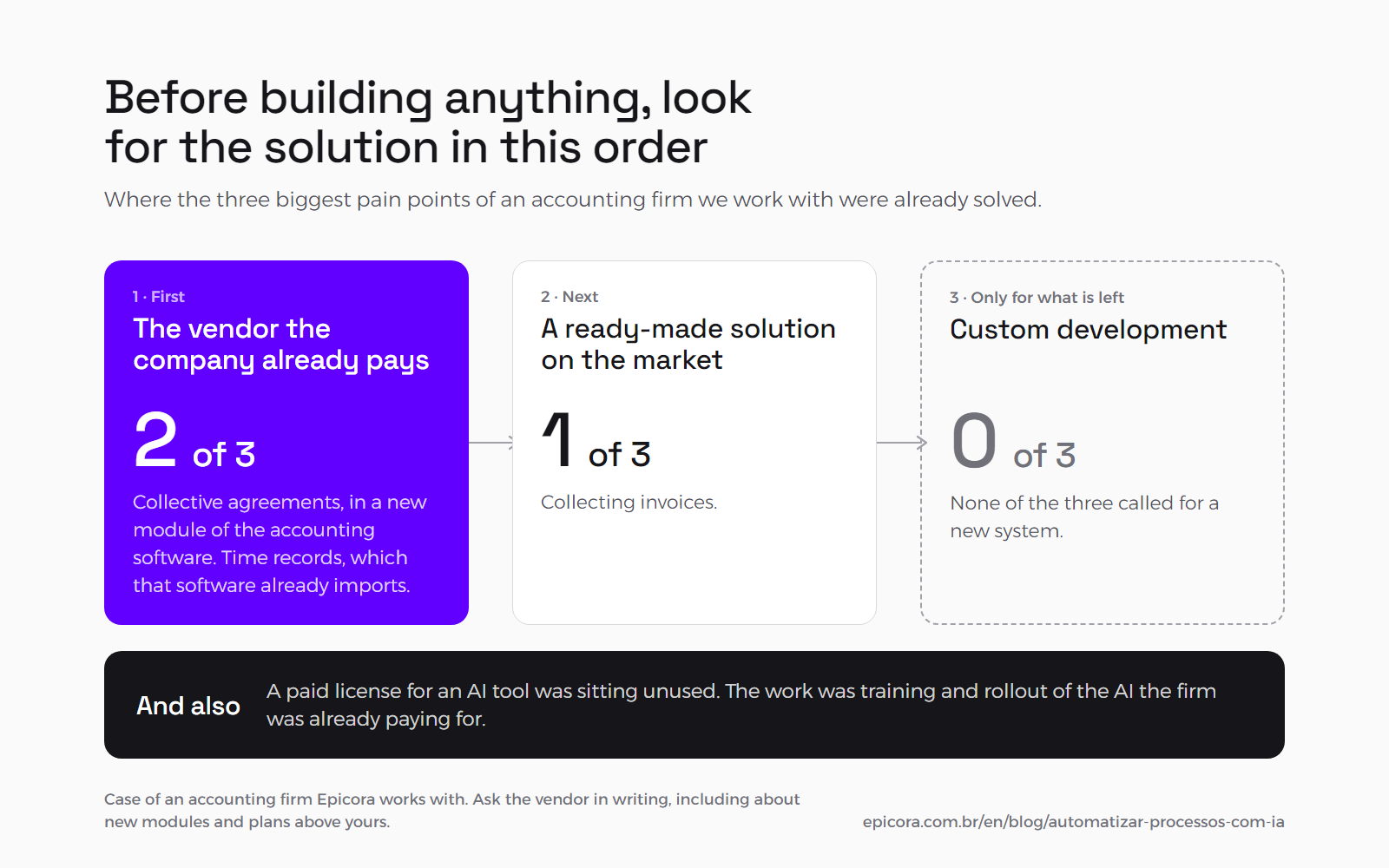
Proposing development for those three pain points would have meant getting the problem wrong. And there was one more finding that no software quote would have solved: a paid license for an AI tool was sitting unused because nobody in that area knew how to use it. The work agreed with the firm was training and rollout of the AI they were already paying for, not a new system.
You can run this check on your own:
- Ask the vendor of each system, in writing, whether it handles that task, including in new modules and in the plans above yours.
- See whether the systems involved already talk to each other through import and export, in a format the other one accepts.
- List the licenses the company already pays for and who actually uses each one.
The checklist for finding a feature that is already in the software, switched off, is in off-the-shelf or custom software.
When a task calls for AI and when it calls for ordinary automation#
AI belongs where there is text without a fixed format to read, classify or write, such as email, documents and messages. Where the task follows a fixed rule, such as copying data, adding up or alerting when a number goes over a limit, the answer is integration or rule-based automation, which is cheaper and works the same way every time. And whatever calls for judgment with consequences stays with a person.
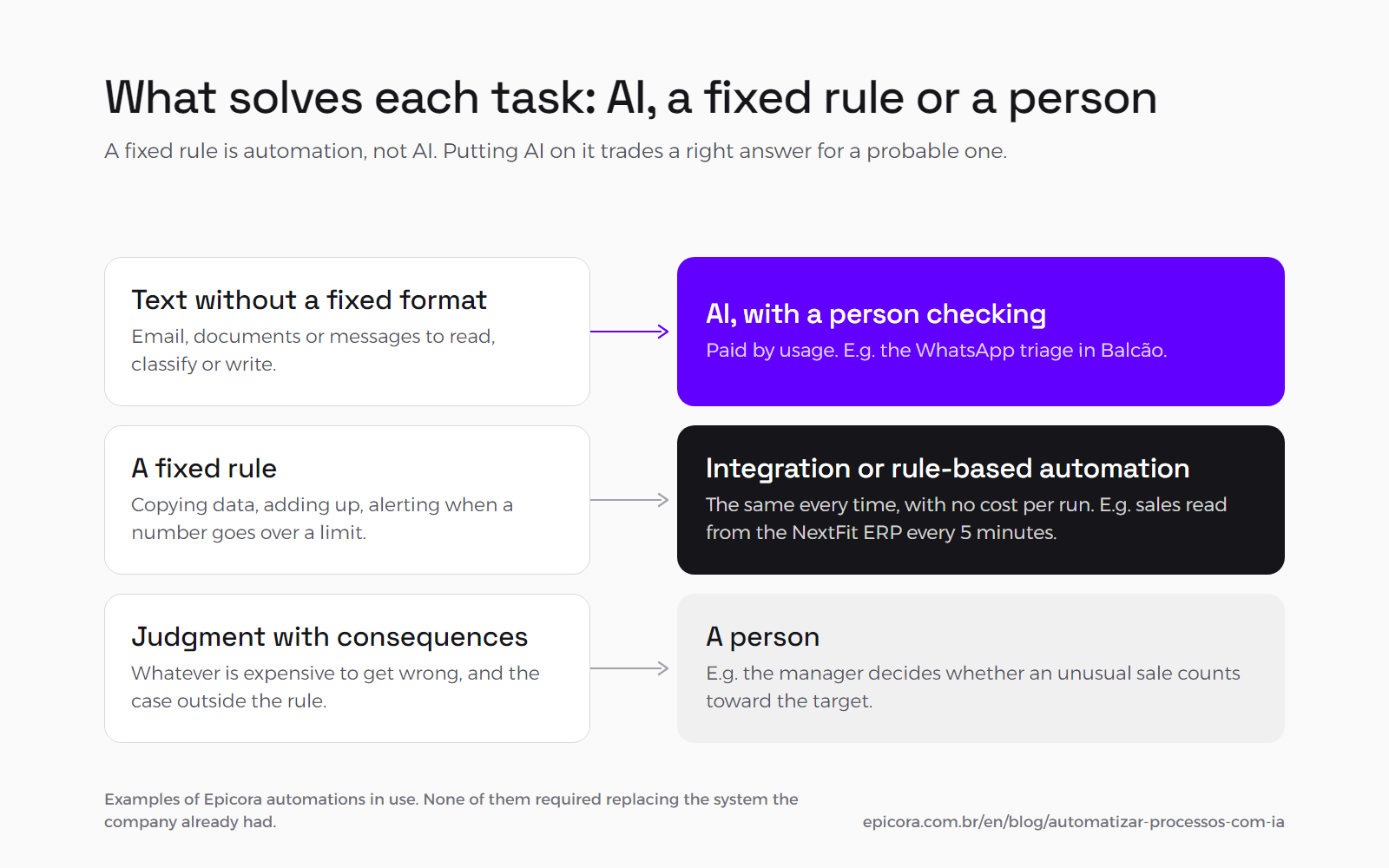
| Type of task | What solves it | Our example |
|---|---|---|
| Copying data from one system to another | integrate, or configure the import the system already has | the Fitness Academia sales-target platform reads sales from the NextFit ERP every 5 minutes, and nobody types in a sale |
| Reading a document without a fixed format | AI, with a person checking the result | in our quoting process, an AI assistant reads the meeting transcript and the client's material |
| Answering a first-contact message | AI, with a handoff to the team | the WhatsApp triage in Balcão, our customer service product |
| Classifying email or messages | AI when the criterion is in the text; a rule when it is in a field, such as sender or subject | in the Balcão triage, the AI separates what it can answer itself from what needs someone on the team |
| Alerting when a number goes over a limit | rule-based automation | in the Cleantec system, the alert fires when one of the 14 microbiological parameters goes over the client's limit |
| Putting together a report | rule-based automation for the numbers, AI for the written commentary | our weekly hours report, pulled from ClickUp |
| Deciding an exception | a person | at Fitness Academia, the manager decides whether an unusual sale counts toward the target |
A fixed rule is automation, not AI. When the task always follows the same path (a plan sale counts toward the target, a parameter over the limit fires an alert), an ordinary program does it the same way every time, with no cost per run. Putting AI on that step trades a right answer for a probable one, and you pay for each one.
AI is worth it where the text changes from case to case. A WhatsApp message never arrives the same as the last one, a client email mixes a request with a complaint, and a contract puts the important clause in a different place in every version. In those tasks a fixed rule breaks, and that is where AI does good work.
How much the AI decides on its own is a separate choice, and the criteria are in AI chatbot, assistant or agent.
Examples of AI automation running today#
We have three automations running that show the split: the WhatsApp triage, with AI; the sales target read from the ERP, an integration with no AI; and our hours report, which mixes the two. None of them required replacing the system that was already there.
WhatsApp customer service triage#
The triage was born for Agência OKSE, a digital marketing agency where every new contact landed on WhatsApp and was answered by whoever was free. The AI agent we set up answers the first contact based on the official material on the agency's website, does not make up prices, does not promise deadlines and hands the conversation to a person when the subject goes beyond what it knows.
That agent became Balcão, Epicora's own product, and on 8 September 2026 OKSE moved onto it as a client. Today Balcão also runs at Fitness Academia, where the AI answers the first contact and books the class, and at Team Garin, an online training and nutrition coaching business, where the AI handles the first part of the sale and hands the conversation to the salesperson before the close.
Sales target read from the ERP#
Fitness Academia, a network of five gyms, already had every sale in the NextFit ERP, and the sales target was rebuilt by hand in a parallel spreadsheet, with different criteria at each location. The platform we built reads NextFit every 5 minutes, never accepts a sale typed in by hand and applies a fixed rule: only plan sales count toward the target.
There is no AI in this flow, and it does not need any. NextFit stayed where it was.
Weekly hours report#
At Epicora, every Monday night the week's hours report for each person on the team comes out, pulled from the time entries in ClickUp. The numbers part is rule-based automation: hours added up by day and by project, and the share of them tied to an identified project.
The text part is AI: a critical reading of the week, which I use to decide whom to talk to, and a draft message for each person. The message never goes out on its own. I read it, adjust it and send it.
How much it costs to run an AI automation#
Running AI is paid by usage: the bill is per token, the chunk of text the model reads and writes, and a conversation costs cents. For the triage in Balcão, our WhatsApp customer service platform, our estimate is about R$ 0.15 (about US$ 0.03) per six-turn conversation on gpt-5.1, close to R$ 150 (about US$ 27) per thousand conversations. Integration and rule-based automation do not carry that cost on every run.
The estimate comes from the actual token count of the triage prompt and the model vendor's price list. The bill grows with the length of the conversation, because on every reply the AI rereads the conversation from the start, and with the size of the model: on gpt-5-mini, the smaller model in the same line, the same conversation comes to about R$ 0.03. The channel, the server and the development are outside that number.
A subscription license is a different bill. The ChatGPT or Claude plan the team uses has a fixed price per person, and an unused license costs the same as a used one.
Before switching it on, set a cap. In Balcão, each client has a daily cap on AI spending, and any cap that is hit triggers an alert. What makes the bill go up or down is in how much it costs to put AI to work inside a company system.
What not to automate and leave with people#
Decisions with consequences, exceptions and the relationship with the client stay with people. AI can prepare almost everything, but whatever is expensive to get wrong, the case outside the rule and the conversation that decides whether the client stays remain with someone on the team.
- Decisions with consequences. A rule we use at Epicora: what is internal and can be undone, the AI can do on its own; what leaves the company goes through a person first. That is why the draft message from our hours report only goes out after I read it.
- Exceptions. At Fitness Academia, the rule says only plan sales count toward the target, and even so the manager has a per-sale switch for the student who transferred between locations or the sale entered at the wrong location. The rule covers the common case, and the exception has an owner.
- The relationship with the client. In the WhatsApp triage in Balcão, the AI handles the first contact and passes the conversation on when the subject goes beyond what it knows. At Team Garin, the AI takes the conversation up to the point of sale, and the close stays with the salesperson.
Frequently asked questions#
Which administrative processes can be automated with AI?#
The ones that involve text without a fixed format: answering a first-contact message, reading and summarizing a document, classifying email and writing the commentary on a report. Tasks that follow a fixed rule, such as copying data between systems, adding things up and sending an alert when a number goes over a limit, get automated without AI, through integration or rule-based automation. Decisions with consequences and exceptions stay with a person.
Do I need to replace my software to automate?#
Almost never. Automation usually reads from the system that already exists and writes back to it, without replacing anything: the Fitness Academia sales-target platform reads sales from the NextFit ERP every 5 minutes, and NextFit stayed in place. Before any development, it is worth asking the software vendor whether it already handles the task, including in recently launched modules.
What is the difference between automation and AI?#
Ordinary automation follows a fixed rule and always does the same thing the same way, such as copying a piece of data or firing an alert. AI reads and writes text that changes from case to case, such as a message or a contract, and gives a probable answer, not a guaranteed one. A fixed rule is automation, not AI, and putting AI on it only makes the task more expensive and less predictable.
How much does it cost to automate a process with AI?#
There are two costs, building and running. Running is charged per token and usually comes to cents per conversation: for the WhatsApp triage in Balcão, we estimate about R$ 0.15 (about US$ 0.03) per six-turn conversation on gpt-5.1, close to R$ 150 (about US$ 27) per thousand conversations. Building depends on the task and the systems involved, and sometimes there is nothing to build, when the solution is already offered by a vendor the company pays.
Where should I start automating in my company?#
With the task list, not the tool. Write down, by area, the tasks that repeat, how often they happen and how long they take, and ask for each one whether a ready-made solution already exists, starting with the vendors the company already pays. What is left over gets split between integration, rule-based automation, AI and what stays with people.
Next step#
Build the task list by area, with volume and time, and run each row through two questions: is there already a ready-made solution, preferably from a vendor you already pay? And does the task involve text to read or write, or does it follow a fixed rule? If what is left calls for AI connected to the company's systems, that is the work we do in AI and automation, as with the customer service triage at Agência OKSE. If what is left is connecting one system to another, it is the work of integrations and APIs.
Want to look at this in your case?
Tell us in a few lines what you have today. We reply with the path that makes sense, even when the answer is not to build anything.