
A connector lets AI read and act in your company's tools with the account of whoever is using it, so nobody has to copy and paste, and for email, calendar, Drive and task managers it already comes ready-made. Your own MCP server is only worth it when the company's own system is the tool that matters, and then it is one more door onto the same API, with the permissions that already exist. What decides the risk is separating reading, which stays free, from writing, which needs approval.
What is an AI connector#
A connector is the link that lets AI read and act in one of the company's tools, such as email, calendar or Drive, using the account of whoever is talking to it. You authorize it once and, from then on, you ask for the task by naming the client or the meeting, and the AI finds what it needs on its own, with nobody copying and pasting anything.
Without a connector, the person using AI at work becomes the messenger. They open the email, copy the thread with the client, paste it into the AI, go back to find the proposal in Drive, paste again, and only then ask the question. With the connector on, "get me ready for the 3 pm meeting" is enough, because the AI checks the calendar, reads the emails exchanged with the people attending and opens the latest document.
For mainstream tools, that connector already exists. According to the Claude Help Center, the Gmail, Google Calendar and Google Drive connectors are available to all users. They do both things: they search and read, and they also write, by sending email, creating events or moving files. By default, every action of the second kind asks for approval first.
A connector works with the account of whoever switched it on. The Claude Help Center puts it this way: connecting a service grants the AI the ability to access and potentially modify data in it based on your permissions. If a person has no access to a folder, the AI connected through their account has none either.
What is an MCP server, and how it differs from a connector#
An MCP server is the technical piece that exposes a system's functions to AI, in the format of the Model Context Protocol, an open standard. The connector is what the person switches on inside the AI app. When a tool has no ready-made connector, someone writes an MCP server for it, and it goes into the app as a custom connector.
The protocol was launched by Anthropic, the company behind Claude, on November 25, 2024. The MCP documentation compares it to a USB-C port: a standard socket for plugging any AI app into any system. In December 2025, Anthropic donated MCP to the Agentic AI Foundation, a Linux Foundation fund co-founded with Block and OpenAI and supported by Google, Microsoft and AWS. In the same announcement, Anthropic counted more than 10,000 active public MCP servers and listed ChatGPT, Gemini, Microsoft Copilot, Cursor and Visual Studio Code among the products that adopted the standard. The current revision of the specification is dated July 28, 2026.
Under the specification, an MCP server offers three things: resources, which are data to look up; prompts, which are ready-made request templates; and tools, which are functions the AI itself runs, such as "find client" or "generate report". Tools are the part that needs the most care, because they are what make the AI act inside the system.
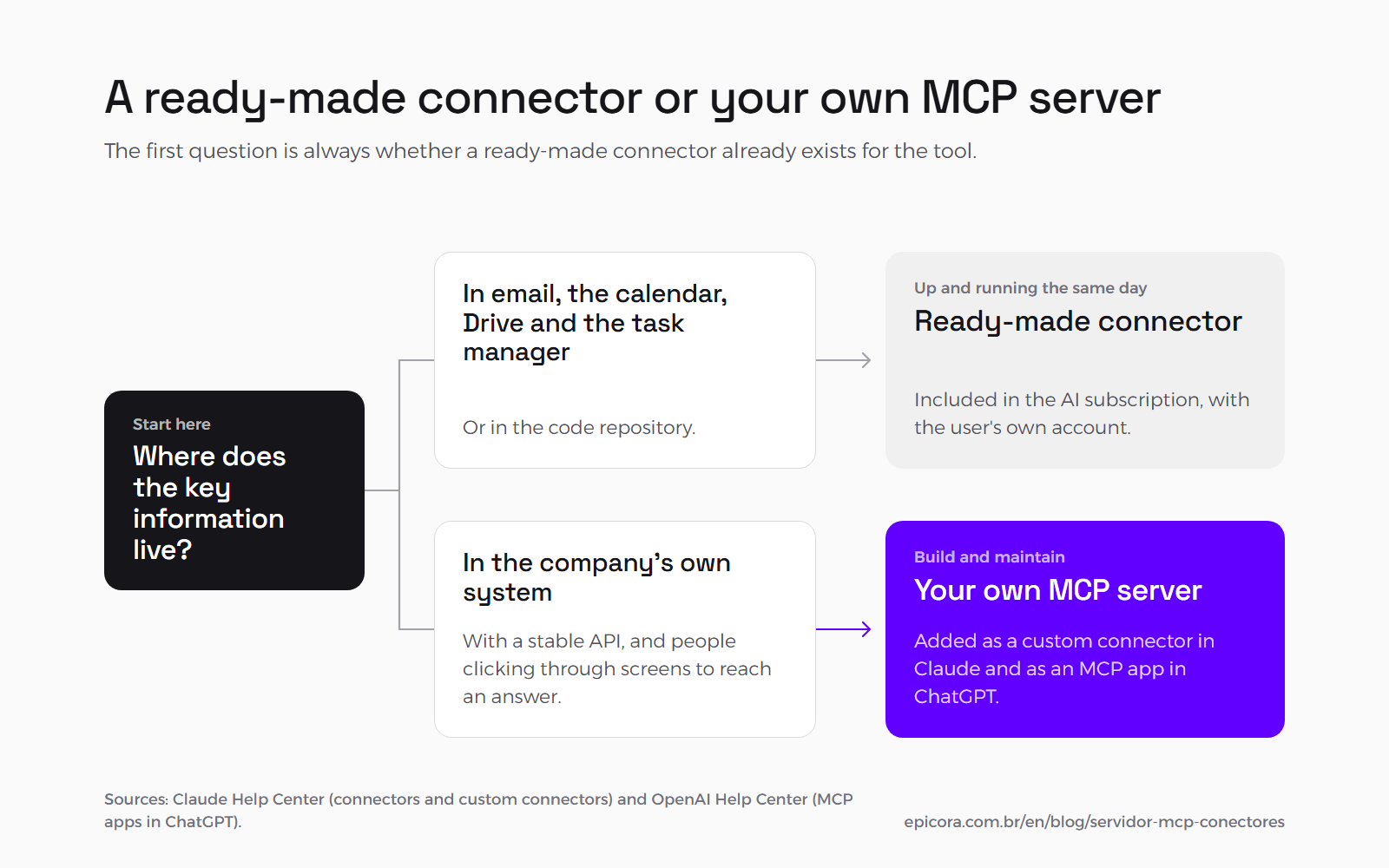
How you plug in your own server varies by app. In Claude, a remote MCP server goes in as a custom connector, on every plan, and on team plans the account owner is the one who adds it. In ChatGPT, according to the OpenAI Help Center, the same feature is called an MCP app, is in beta on Business, Enterprise and Edu plans, runs on the web version only and needs an admin to publish it.
| Ready-made connector | Your own MCP server | |
|---|---|---|
| What for | email, calendar, Drive, task manager, code repository | the company's own system |
| Who builds it | the AI vendor or the tool vendor | the company, or whoever it hires |
| How it is switched on | in the app's connectors screen, with the person's account | by the server's address, enabled by the admin |
| What it costs | included in the AI subscription | building and maintaining the server |
| What weighs on it | the connector's limits, which you cannot change | authorization, and maintenance when the specification changes |
The table shows why the first question is always whether a ready-made connector exists: when it does, the company uses it the same day, with no development cost.
What AI does once it is connected to the company's tools#
Connected to the tools, AI does the work of finding and assembling information on its own, at a set time or when someone asks. At Epicora, the everyday example is Radar IA, a briefing of artificial intelligence news that the AI starts putting together at 6:30 am and sends through the Gmail connector, without anyone opening their email to write it.
Radar is a scheduled task in the Claude app: the request is written once and runs at the set time. According to the Claude Help Center, scheduled tasks are available on paid plans and can use the connectors the person has already set up. At 6:30 am, with the Claude app open, a program captures what 17 sources have published, mostly official (AI labs' blogs, newsrooms and release notes), plus researchers' and investors' blogs. The AI reads the captured items, picks at most 8, summarizes each in two or three lines and sends the email through the Gmail connector. Between September 11 and October 8, 2026, there were 25 issues.
Two rules written into the task itself hold up that autonomy. The first is the fixed recipient: the email goes to a single internal address, and the instructions forbid any other. The second is that the content of the sources is treated as data. If a captured text carries an order for the AI, it ignores it and treats it as content, which is the basic defense against prompt injection, the attack in which outside text tries to give the AI orders.
The other example is the hours report, which the AI builds every Monday by reading the team's time entries in ClickUp, our task manager, through its connector. It is described in chat, assistant or AI agent.
In both cases, the AI uses ready-made connectors, with no custom MCP server.
Reading is free, writing needs approval#
The rule we use to decide what the AI does on its own looks at what the action does, in any app. Everything internal and reversible is free, and reading is the clearest case, because reading changes nothing. Everything that leaves the company or cannot be undone, such as sending email, commenting or deleting, stops and asks a person for approval.
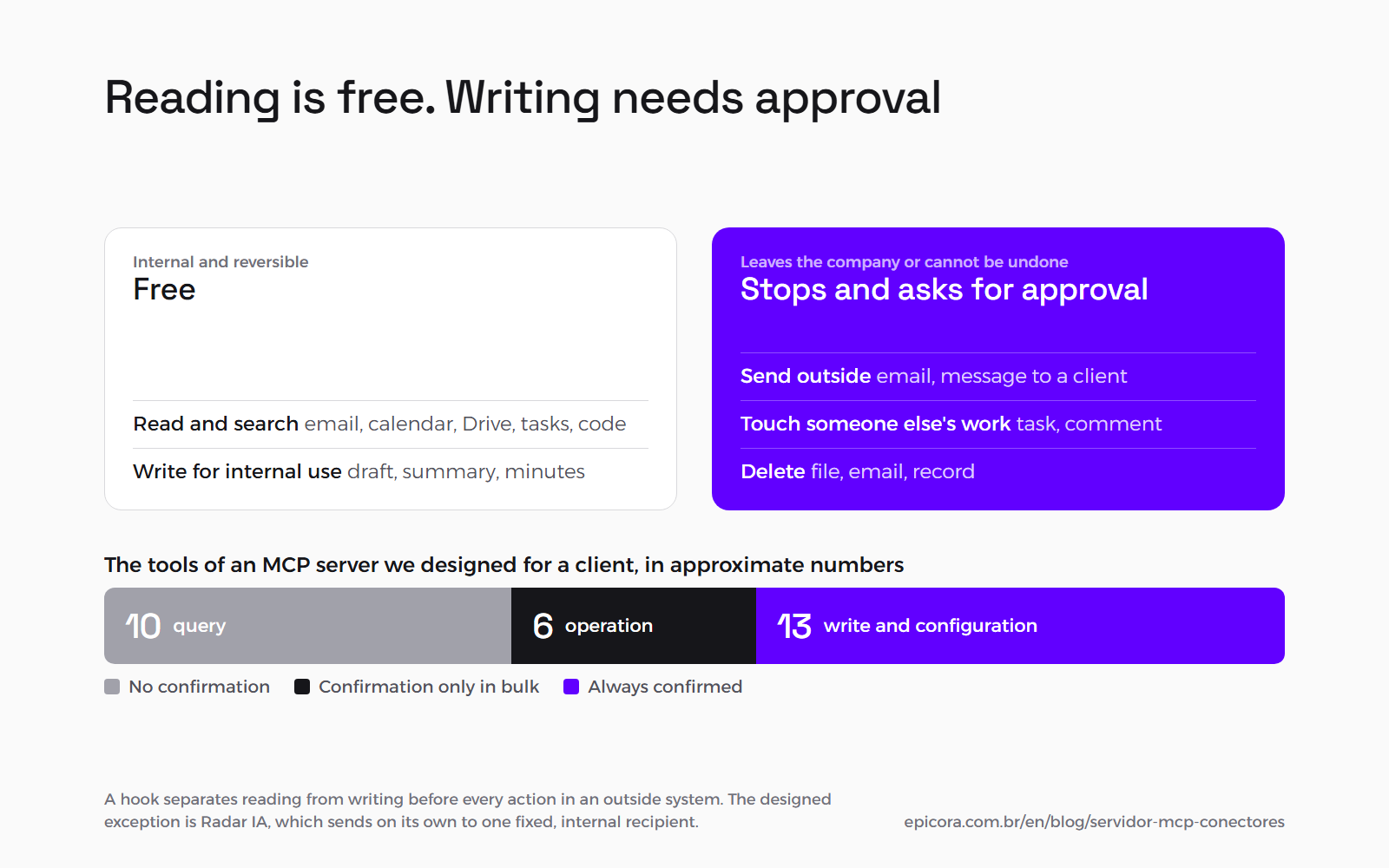
That rule is written into our AI usage policy. Reading ClickUp, GitHub, Drive and the calendar is free. Sending email, messaging a client, commenting on someone else's task, creating or changing someone else's task and deleting anything need approval. The policy does not depend on the AI remembering it: a hook, which is a small program that runs before actions in outside systems, separates reading from writing. Reading goes through; sending, creating, changing, deleting and commenting stop and wait for a "go ahead".
The MCP specification points the same way. In the section on tools, it recommends that there always be a human in the loop with the ability to deny the call, and that the app show a confirmation prompt before operations. Apps follow this differently. In Claude, according to its Help Center, sending email or moving a Drive file asks for approval by default. In ChatGPT, according to OpenAI, confirmation depends on the app's permissions, the context and the impact of the action, and some especially risky actions are blocked instead of being offered for approval.
| Action | Example | Rule | Why |
|---|---|---|---|
| Read and search | emails, calendar, Drive files, tasks, code | free | it changes nothing |
| Write for internal use | draft, summary or minutes in the company repository | free | it is reversible and nobody outside sees it |
| Send outside | email, message to a client, a post | approval | once sent, it does not come back |
| Touch someone else's work | a task, a comment, an event in someone's calendar | approval | it changes the day of someone who did not ask |
| Delete | file, email, record | approval | it may not be undoable |
| Send in a routine with a fixed recipient | Radar IA's daily email | runs on its own, with the recipient fixed in the instructions | the only reader is the routine's own owner |
The last row is the one exception, and it was designed that way: a routine that writes, but to a single, known, internal destination. That fixed destination is a rule written into the instructions, with no technical block behind it, and what the routine sends is a summary of public news. Before letting any write run without approval, it is worth asking whether its worst possible mistake would be acceptable.
When your own MCP server for the company's system is worth it#
Your own MCP server is worth it when the company's system is the tool that matters, it already has a stable API, and people spend time clicking through screens to reach an answer. When the work happens in email, calendar and Drive, the ready-made connectors are enough, and your own server becomes a cost with no return.
The criteria below come from a server we designed for a client's management system, with its own calculation engine and many screens. The problem it addresses is time to answer: on screen, every decision means opening the dashboard, finding the module and going through a multi-step wizard. The server was designed so the team can operate the system by talking to it, in the AI each person already uses.
One more door onto the same API#
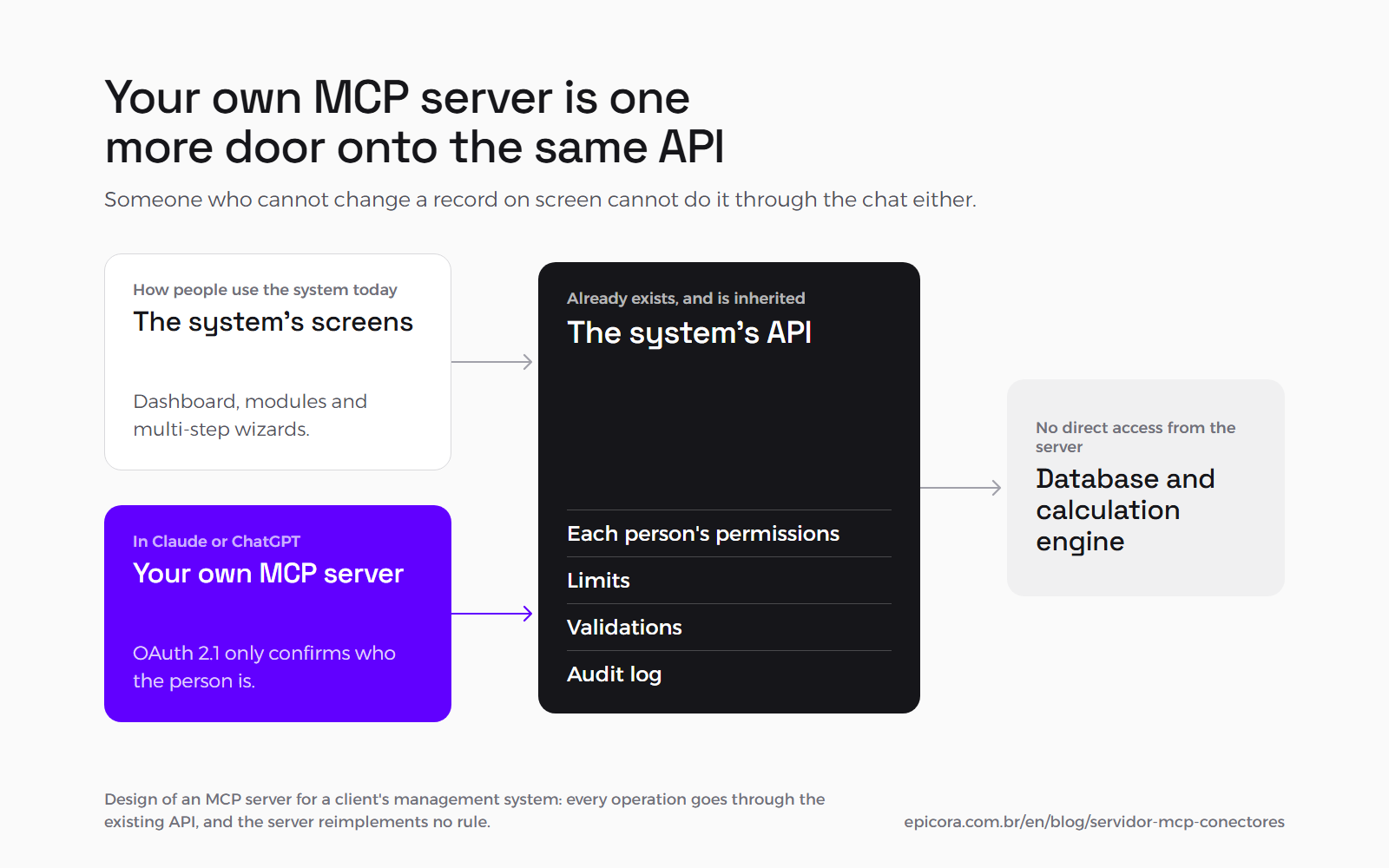
Your own MCP server should be just one more door onto the same API the system's screens already use. That way, permissions, limits, validations and the audit log are inherited, and the server reimplements none of them.
In the design we made for the client, the server does not touch the database directly: every operation goes through the existing API. Authorization uses OAuth 2.1, the login standard the MCP specification adopts, only to confirm who the person is. The permission for each call is still the one that person already has in the system. Someone who cannot change a record on screen cannot do it through the chat either, and gets a simple answer saying they do not have permission.
AI triggers the system and does not do the math#
In a system that calculates, the AI should not calculate. It interprets the request and triggers the engine that already exists, and the result is exactly what the screen would show, with the same precision and the same record.
That is the central principle of the server we designed, and it is the same one we follow in Sistema Cuidar, where the AI writes 5 of the 15 sections of the report and cannot make up a number: the risk matrix is calculated from the answers. When the AI only chooses which function to call and with which filters, the number comes from code that has already been tested.
Few tools, with the risk marked on each one#
A good MCP server has a few high-leverage tools, and each one says whether it only reads or changes data. The server we designed has about 10 query tools, 6 operation tools and 13 write and configuration tools, and only the write tools always ask for confirmation.
In that server, a single operation tool brings together a six-step wizard from the screen. In the chat, the person describes what they want and the AI fills in the parameters. Query tools run without confirmation. Operation tools only ask for confirmation when processing is in bulk, so the person knows it will take a while. For AI apps that do not yet show the protocol's confirmation prompt, a write tool called without the confirmed flag only returns a preview of what it is going to do, without calling the API.
What it costs and who pays for the AI usage#
The cost of your own MCP server is building and maintaining the server. AI usage is not part of it, because it stays on the subscription the company already pays for in Claude or ChatGPT, and the server is only the bridge between the system and that AI.
The server we designed was estimated at 169 hours in the realistic scenario, adding up development, testing and management, on top of a ready, documented API. The most uncertain item in the estimate is authorization. Maintenance has a cost few people plan for. When we designed the server, in June 2026, the current revision of the specification was the one from November 25, 2025, and the July 28, 2026 revision has since replaced it. Every new revision, and every change to the system's API, means the server has to be reviewed, and in the project that review is part of the maintenance of the system itself.
What a connector does not solve#
A connector does not grant new permissions, does not tidy up messy information and does not do everything the tool does on screen. It inherits the access of whoever switched it on, delivers what the vendor's API lets through and reads information the way it is stored, organized or not.
The limits show up in use. On Radar IA, we measured on September 12, 2026 what the Gmail connector does to an email: images are stripped from the body, every link arrives rewritten through a Google address that shows a redirect warning before opening, and a background color written in shorthand is discarded. That is why Radar's header is text only, with no logo. The Claude Help Center itself warns that attachment content does not come through the Gmail connector, only the attachment's metadata.
The Drive connector has limits too. In a project in July 2026, it could see a folder of logos a client had shared, but it did not list or download the files inside, and someone had to download them by hand.
Connecting AI to Drive does not organize Drive either. If the current contract exists in three versions with similar names and no folder says which one is valid, the AI will find all three and may pick the wrong one. That work comes before the connector, and it is described in how to organize company knowledge for AI.
The last limit is trust in the server. The Claude Help Center recommends connecting only servers built and hosted by organizations you trust, and OpenAI's warns that an untrusted MCP server increases exposure to prompt injection.
Frequently asked questions#
What is an MCP server and what is it for?#
It is a program that makes a system's functions available to an AI, in the format of the Model Context Protocol, the open standard Anthropic launched in 2024 and that ChatGPT, Gemini, Microsoft Copilot and Cursor have also adopted. It lets the AI query and operate the system at the request of whoever is talking to it, without anyone opening screens and copying data into the chat.
What is the difference between a connector and an MCP server?#
The MCP server is the technical piece that exposes the system's functions. The connector is what a person switches on inside the AI app, with their own account, to use those functions. The Gmail, Calendar and Drive connectors come ready-made in Claude, and your own MCP server goes into Claude as a custom connector and into ChatGPT as an MCP app.
Can the AI send email on my behalf without me seeing it?#
Not by default. According to the Claude Help Center, sending, replying to and forwarding email asks for your approval first, and on Team and Enterprise plans the admin decides whether those actions can run without asking. In ChatGPT, confirmation depends on the app's permissions and the context, and high-risk actions may be blocked.
Does my company need its own MCP server?#
Most do not. If the work happens in email, calendar, Drive and the task manager, the ready-made connectors are enough. Your own server starts to make sense when the company's system is where the information that matters lives, it already has a stable API, and people waste time clicking through screens to get an answer.
How much does your own MCP server cost?#
It depends on the API that already exists. For a server we designed on top of a system with a ready, documented API, the estimate was 169 hours in the realistic scenario, with authorization (OAuth 2.1) as the most uncertain item. AI usage is not part of that number: it stays on the subscription the company already pays for, in Claude or ChatGPT.
Sources#
- Model Context Protocol, specification, current revision of July 28, 2026 (resources, prompts and tools; user consent): https://modelcontextprotocol.io/specification/latest
- Model Context Protocol, specification: tools (a human in the loop able to deny the call; confirmation before operations): https://modelcontextprotocol.io/specification/2026-07-28/server/tools
- Model Context Protocol, introduction (the USB-C comparison): https://modelcontextprotocol.io/docs/getting-started/intro
- Anthropic, "Introducing the Model Context Protocol", November 25, 2024: https://www.anthropic.com/news/model-context-protocol
- Anthropic, donating MCP to the Agentic AI Foundation, December 9, 2025 (founders, supporters, adoption and the 10,000+ public servers): https://www.anthropic.com/news/donating-the-model-context-protocol-and-establishing-of-the-agentic-ai-foundation
- Claude Help Center, Google Workspace connectors (availability, approval by default, the admin's role, Gmail attachments): https://support.claude.com/en/articles/10166901-use-google-workspace-connectors
- Claude Help Center, custom connectors using remote MCP (plans, who adds them, inherited permissions, trusted servers): https://support.claude.com/en/articles/11175166-getting-started-with-custom-connectors-using-remote-mcp
- Claude Help Center, scheduled tasks: https://support.claude.com/en/articles/13854387-schedule-recurring-tasks-in-claude-cowork
- OpenAI Help Center, developer mode and MCP apps in ChatGPT (plans, write confirmation, blocking of risky actions, prompt injection): https://help.openai.com/en/articles/12584461
Next step#
If your team loses time copying data from your system into AI, or you want to know whether your system can support an MCP server, that is the conversation we have in AI and automation. When the question is connecting systems to each other before connecting AI, it starts in integrations.
Want to look at this in your case?
Tell us in a few lines what you have today. We reply with the path that makes sense, even when the answer is not to build anything.